Guru Maps Pro & GPS Tracker
- 4.5
- Rating
- 50.00K
- Installs
- $89.99
- Price

 Analysis by App-foxy
I approached Guru Maps Pro & GPS Tracker as a travel tool rather than another everyday map shortcut. Its purpose is straightforward: help me prepare a map before a journey and make navigation less dependent on a constant connection. That sounds simple, but it changes how I think about route planning. Instead of waiting until I am already outside to search for a place, I can treat the map as something to prepare in advance.
This app sits in the Maps & Navigation category and is developed by Evgen Bodunov. It is an app for Everyone, with a current version of 6.1.1 and support for devices running Android 6.0 or later. The store summary focuses on getting a map before a trip and navigating with confidence even offline, and that focus is important: the experience is built around preparation, not just live searching.
My overall impression is that Guru Maps is most interesting for people who travel beyond reliable mobile coverage, keep an eye on data use, or dislike discovering too late that a familiar online map has become useless. It is less compelling if all I need is live traffic, constantly updated business information, or the quickest possible route through a busy city. The value depends heavily on how I travel and how much effort I am willing to put in before leaving.
You May Also Like

 Blood Strike: 2.5 Anniversary
Blood Strike’s Loadouts Turn Every Drop Into a Tactical Gamble
A close look at Blood Strike’s custom loadouts: how fast access to signature weapons reshapes its battle royale rhythm, rewards preparation, and narrows the gap between fights.

 Pandora - Music & Podcasts
Pandora’s Music Is Easy to Start, but Harder to Recover
Pandora’s strength is its low-effort path from a seed to a station. Its weak spot is how much confidence it asks you to place in connection, setup, and quiet recovery.

 8 Ball Pool
 Is Built on Rivalries, Rematches, and Routine
A close look at the rivalries, rematches, shared routines, and unanswered safety questions that turn a quick pool match into a persistent mobile community.

 Samsung Music
’s Quiet Strength Is Playing What You Already Own
Its reach comes less from spectacle than from dependable access to a personal library. That simplicity is both the app’s strongest retention engine and its ceiling.

 AccuWeather: Weather Radar
AccuWeather Review: A Quick, Clear Forecast for Everyday Decisions
For everyday plans, the best forecast is the one you can understand quickly. AccuWeather makes rain timing, radar, and local conditions easy to act on, with a few trade-offs.

 Hill Climb Racing
Why Hill Climb Racing Still Turns Crashes Into One More Run
A tiny car, a bumpy hill and one more upgrade: Hill Climb Racing keeps resurfacing because its simple chaos makes every near-miss feel personal.
More From Our News Desk
View All News


Connectivity changes the way I use the map
The first difference I noticed is psychological. With a typical online mapping service, I tend to search while moving: type a destination, wait for results, follow the suggested route, and repeat when plans change. Guru Maps encourages the opposite habit. I need to think about the area I will visit, prepare the relevant map, and make sure it is available before the journey begins. That extra step can feel unnecessary at home, but it becomes sensible when a road, trail, ferry route, or rural stop may have weak coverage.
That preparation also exposes a trade-off. A preloaded map can be more dependable in a dead zone, but it cannot magically provide every live service associated with a connected map. I would not choose this app expecting the same experience as a cloud-first navigation service that constantly refreshes traffic, places, road closures, or business details. Guru Maps is strongest when the basic map itself is the priority and connectivity is uncertain.
A realistic example is a weekend drive through an unfamiliar countryside area. Before leaving, I would prepare the map for the complete region rather than only the final destination. I would also check the route while I still have a reliable connection, because correcting an incomplete preparation later may be difficult. Once on the road, the app becomes useful precisely because I am not treating mobile data as guaranteed.
The important habit is to prepare the map before the signal becomes important. That sounds obvious, yet it is the detail that separates a dependable trip from a stressful one. A destination search that worked in the kitchen does not prove that every surrounding road or side trip will be available later. I would prepare a wider area than the shortest route requires, especially if I expect to make spontaneous stops.
What happens when the connection is good
With a stable connection, Guru Maps feels less like an emergency backup and more like a deliberate planning workspace. I can decide where I am going, inspect the area, and organize my journey before I move. This is useful for travelers who prefer to make decisions calmly rather than while standing beside a station or driving toward a junction.
There is also a practical advantage to separating planning from travel. If I prepare at home or in a hotel, I can spend time checking whether the map covers the places I actually intend to visit. That is a better workflow than assuming that a route shown online will remain equally useful after leaving the network. I found this especially relevant for trips with several stops, where the final destination alone does not represent the whole journey.
Still, a connected map service remains more convenient for constantly changing situations. If I am looking for a restaurant that opened recently, reacting to congestion, or checking a last-minute closure, a mainstream online alternative may be faster. Guru Maps should not be judged as a replacement for every connected mapping function. Its appeal is the control it gives me over the map I take with me.
Using it on foot, in a car, and away from the city
In a car, the app makes the most sense when the trip leaves dense urban coverage. A long drive through remote areas can include stretches where navigation apps struggle to refresh. Preparing first gives me a better chance of keeping the journey understandable when the connection disappears. I would still review the route before departure and avoid assuming that a digital map removes the need for ordinary road awareness.
For walking, the useful scenario is different. City streets may have excellent service, but travelers often move between underground stations, large buildings, parks, and crowded areas where reception is inconsistent. A prepared map can help me orient myself without repeatedly waiting for tiles or search results. The benefit is not limited to remote hiking; it also applies to a phone battery and data plan that I would rather not spend refreshing the same area.
On a cycling trip, preparation becomes even more important because a small detour can turn into a large problem when I am far from the starting point. I would prepare the entire riding area, not merely the first section, and keep the phone accessible without constantly interacting with it. The app can support that kind of self-contained planning, but it does not replace judgment about weather, road conditions, or whether a route is suitable for the vehicle or activity.
People who travel internationally may also appreciate the data-conscious approach. Roaming can make casual map browsing expensive or inconvenient, while downloading or preparing the needed map through a connection I trust gives me more control. I would do that before leaving home or while using dependable Wi-Fi, then test the prepared area before relying on it abroad. That last check is a small step, but it prevents false confidence.
Recovery when the network or plan fails
The real test for a navigation app is not the perfect journey. It is the moment when the connection drops, the route changes, or I realize that my original plan was too narrow. Guru Maps is designed around having map material ready beforehand, so its recovery strength depends on how well I prepared. If I covered the whole travel area, losing the network is much less disruptive. If I only prepared one destination, an unexpected detour can expose the limits of my planning.
That is why I would use a simple recovery routine. Before departure, I would open the map, inspect the route, and move around the surrounding area to confirm that the places I may need are included. I would then keep a basic written note of the destination and important turns for especially remote journeys. This is not a criticism unique to Guru Maps; it is sensible practice whenever a phone becomes part of a safety-critical plan.
A second recovery issue is changing the destination after the connection has gone. A prepared map may still let me view the relevant region, but I should not assume that every new search or live detail will behave like it does online. My advice is to prepare likely alternatives in advance: the next town, a fuel stop, a hotel area, or a return route. That takes a few minutes and is more useful than hoping a weak signal will appear at exactly the right time.
Battery failure is another limitation that no map application can solve by itself. Offline-ready navigation can reduce network dependence, but the phone still needs power and the user still needs to see the screen. On a long trip, I would carry a power bank or keep the phone charged before setting out. I would also avoid leaving the display active unnecessarily when I already know the next part of the route.
These details reveal the app's central trade-off: it rewards a prepared traveler. Someone who wants the software to make every decision dynamically may find the workflow restrictive. Someone who likes to build a dependable travel kit before leaving will probably see the same workflow as a strength.
Keeping mobile data under control
Guru Maps is a good fit for people who actively manage mobile data rather than letting every app refresh freely. Preparing a map in advance means I can choose when the connection is used for planning. That is useful on limited data plans, during international travel, or in places where the network is technically available but frustratingly slow.
I would not treat preparation as a one-time task for every future journey. Maps and travel plans change, so I would refresh the areas I genuinely need before important trips. The practical compromise is to prepare a focused region rather than trying to keep an entire country ready. A focused map is easier to manage and better matches the way most journeys are planned.
There is also a privacy-related comfort in doing more navigation locally, although I would avoid making assumptions about the app's policies beyond what I can personally observe. From a practical perspective, fewer moments spent requesting map content can make the phone feel more predictable. I know when I prepared the journey, what area I intended to use, and which parts of the trip may still require a connection.
For everyday commuting, this may be more effort than necessary. If I travel the same city route every day and depend on live traffic, a conventional online map is probably the better tool. Guru Maps becomes more persuasive when the journey is occasional, unfamiliar, international, or outside dependable coverage. The app is not trying to win every navigation situation; it is aimed at the moments when connectivity should not be the single point of failure.
Who will appreciate the Pro version
The app is listed at $89.99, which makes the purchase a serious decision rather than an impulse download. I would recommend considering that cost in relation to travel frequency. A person who takes regular road trips, spends time in remote areas, or wants a dedicated navigation tool may find the investment easier to justify. Someone who only needs directions for occasional city errands may get better value from a familiar alternative.
The audience size suggests that it has found a committed group of users: Guru Maps has more than two thousand ratings, averages 4.5, and has passed fifty thousand installs. Those figures do not prove that it will suit everyone, but they do indicate that the app is not an obscure experiment with no practical audience. I would still judge it by workflow rather than popularity, especially because the price raises the standard I would expect.
The developer, Evgen Bodunov, has kept the product focused on mapping and navigation rather than turning it into a general travel platform. I like that focus. The app does not need to distract me with social features or booking tools when my main concern is carrying a usable map through uncertain connectivity. At the same time, users who want one app for traffic, reservations, reviews, public transport updates, and live discovery may find the focused approach incomplete.
Its age rating of Everyone also makes it broadly approachable for households and travelers who want a straightforward navigation tool. The minimum operating-system requirement is Android 6.0, so owners of older compatible phones may be able to use it, while anyone on an earlier system would need to check device compatibility before planning around it. I would also make sure the phone has enough storage and battery for the intended trip, since map preparation is only useful if the device can support it comfortably.
How it compares with familiar map alternatives
The usual online map is better when I need the freshest possible local information. It tends to feel effortless: open the app, search, and let the service handle much of the background work. That convenience is hard to beat in a connected city. Guru Maps asks me to take more responsibility, but in return the journey is less tied to the quality of the signal at that exact moment.
A dedicated offline map can also be preferable to switching between downloaded areas inside a broader online service. The distinction is not simply about whether a map can be viewed without a connection. It is about whether offline use is central to the planning mindset. Guru Maps puts that use case at the front, which suits travelers who want to prepare deliberately rather than discover offline tools after a problem occurs.
For live driving conditions, I would choose the online alternative. For an international trip where roaming is a concern, I would give Guru Maps stronger consideration. For a remote route, I would use it alongside sensible backup planning rather than treating it as an infallible guide. For a daily urban commute, I would probably stay with the app that already knows my routines and provides current traffic information.
One non-obvious trade-off is that connectivity independence can make the map feel calmer but less dynamic. I gain predictability and reduce reliance on the network, yet I may lose the convenience of discovering changes as they happen. Neither approach is universally superior. The right choice depends on whether my biggest risk is missing a live update or losing access to the map altogether.
My practical setup before a journey
Before using Guru Maps for a significant trip, I would prepare more than the final address. I would include the departure area, the full route corridor, likely detours, and the place where I expect to stop. I would then inspect the map with the connection available and make sure the screen shows the level of detail I need. This is the most useful workflow improvement I can offer because it turns the app from a last-minute rescue tool into a planned travel companion.
I would also prepare for the question, “Can I change plans later?” The answer depends on what I arranged beforehand and whether a connection returns. For a flexible trip, I would include nearby towns and alternative destinations instead of preparing a narrow line between two points. That small amount of extra coverage makes spontaneous decisions less risky.
Another question is whether the app is suitable as the only navigation method. In a familiar city, perhaps; on a remote journey, I would not rely on any single electronic tool. I would keep the phone charged, know the general direction of travel, and carry another form of essential information when the consequences of getting lost are serious. Guru Maps can reduce network dependence, but it cannot remove every travel risk.
Users may also wonder whether the high price is justified. My answer is conditional. If I expect to use the app repeatedly in places where connectivity, roaming, or data limits are genuine problems, the focused design may be worth paying for. If I am comparing it with free, connected map apps for ordinary errands, the price is difficult to defend. The value is in dependable preparation, not in replacing every feature of a larger mapping ecosystem.
Finally, I would ask whether the app is better for planning or for spontaneous discovery. In my experience, it is better for the former. I can prepare a region, think through alternatives, and travel with less dependence on a live connection. It is not the first tool I would open to browse whatever happens to be nearby in the moment, especially when current listings or traffic matter more than map availability.
My connectivity verdict
Guru Maps Pro & GPS Tracker is a specialized navigation app with a clear point of view: a journey should not fall apart simply because the network does. I appreciate that it makes preparation part of the experience instead of hiding it behind an assumption of permanent connectivity. For road trips, international travel, rural routes, and data-conscious users, that approach can be genuinely reassuring.
Its weaknesses are tied to the same design choice. I have to prepare responsibly, and I should not expect a prepared map to provide every live service associated with an online platform. The $89.99 price also means casual users should think carefully before committing. If live traffic, current business information, and effortless spontaneous searches are my priorities, a conventional connected map is likely a better match.
I would recommend Guru Maps to a friend who regularly travels beyond reliable coverage and wants a focused tool that can be made ready before departure. I would skip it for someone who mainly navigates familiar city streets and already depends on live updates. For the right traveler, its strongest feature is not a flashy extra but a change in routine: prepare while connected, then travel with fewer worries about what happens when the signal disappears.
FAQs for Guru Maps Pro & GPS Tracker
01What is Guru Maps Pro & GPS Tracker used for?
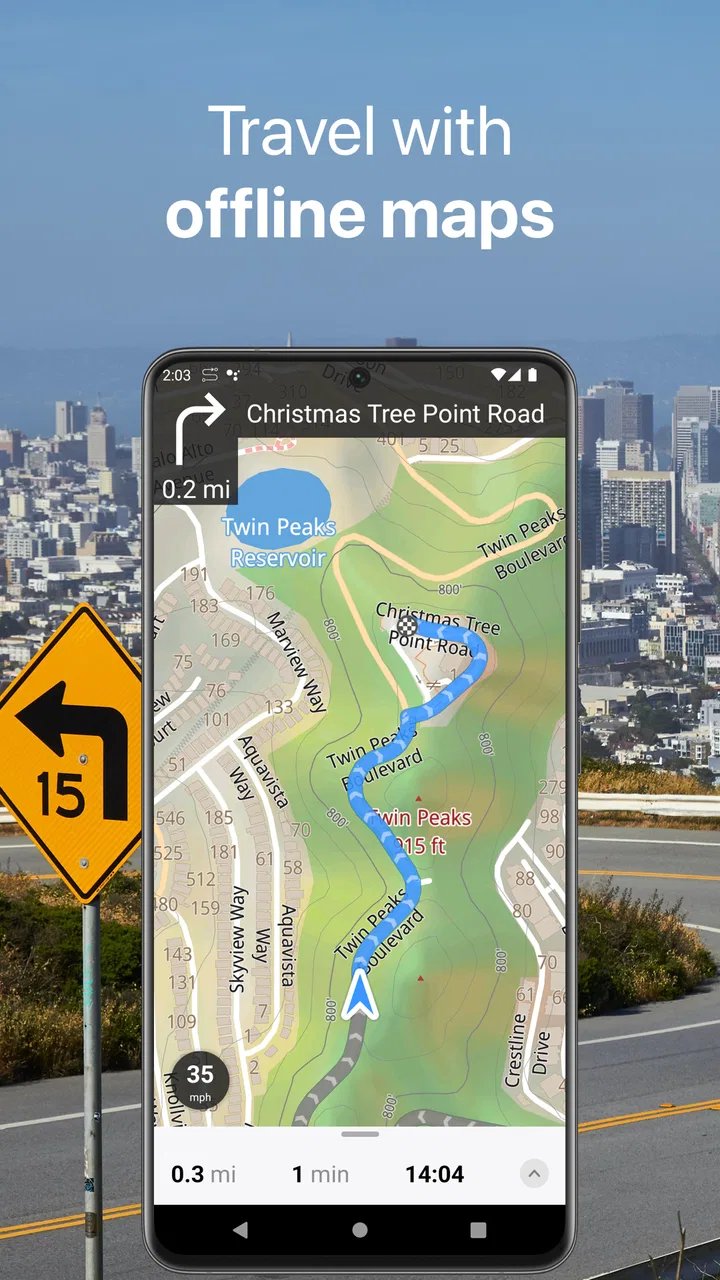
Guru Maps Pro & GPS Tracker is an offline navigation and mapping app designed for drivers, hikers, cyclists, travelers, and outdoor users. It lets you download maps for use without mobile data, search for places, plan routes, record GPS tracks, save favorite locations, and navigate with turn-by-turn guidance. It is particularly useful when traveling abroad or exploring areas with unreliable internet coverage.
02Does Guru Maps Pro work without an internet connection?
Yes. After downloading the required map regions while connected to Wi-Fi or mobile data, you can use the main navigation and mapping features offline. Offline access is helpful for avoiding roaming charges and navigating in remote areas. However, features that depend on live information—such as current traffic, online searches, map updates, or certain location details—may require an internet connection.
03What navigation and route-planning features are included?
The app provides turn-by-turn navigation, route planning, voice guidance, saved places, and support for different travel profiles such as driving, walking, or cycling, depending on the selected map data and device. Users can create routes, follow recorded tracks, and inspect map details before starting a journey. It is best to verify the route in advance, especially in rural or less-mapped locations.
04Can I use Guru Maps Pro to record and export GPS tracks?
Yes. Guru Maps Pro includes GPS tracking tools that can record your movement during activities such as hiking, cycling, road trips, or sightseeing. Recorded tracks can be saved for later reference and may be exported or imported using supported file formats, which is useful for sharing routes or transferring them between devices. Battery consumption can increase during long tracking sessions.
05Is Guru Maps Pro worth downloading, and are there any limitations?
Guru Maps Pro is a strong option for users who need reliable offline maps, route planning, and GPS tracking in one application. Its greatest advantages are reduced dependence on mobile data and useful tools for travel and outdoor navigation. Before downloading, check the current price, supported map coverage, update policy, and device requirements, since some advanced features or map packages may vary by platform.
Pros
- Detailed offline maps work without mobile data or roaming.
- Turn-by-turn navigation supports driving
- walking
- and cycling routes.
- Tracks
- waypoints
- and routes can be recorded and organized easily.
- Fast map rendering remains responsive on most modern devices.
- Privacy-friendly design does not require constant account-based tracking.
Cons
- Premium features require a paid upgrade or subscription
- depending on the platform.
- Downloading large regions can consume considerable storage space.
- Traffic and some online data features depend on an internet connection.
- Map coverage and address accuracy vary between countries and regions.
- The interface may feel complex for users seeking a very simple GPS app.

Guru Maps Pro & GPS Tracker
Gallery